| Component | What it provides |
|---|---|
| Timeback APIs | 1EdTech standards for rosters, content, events, and more |
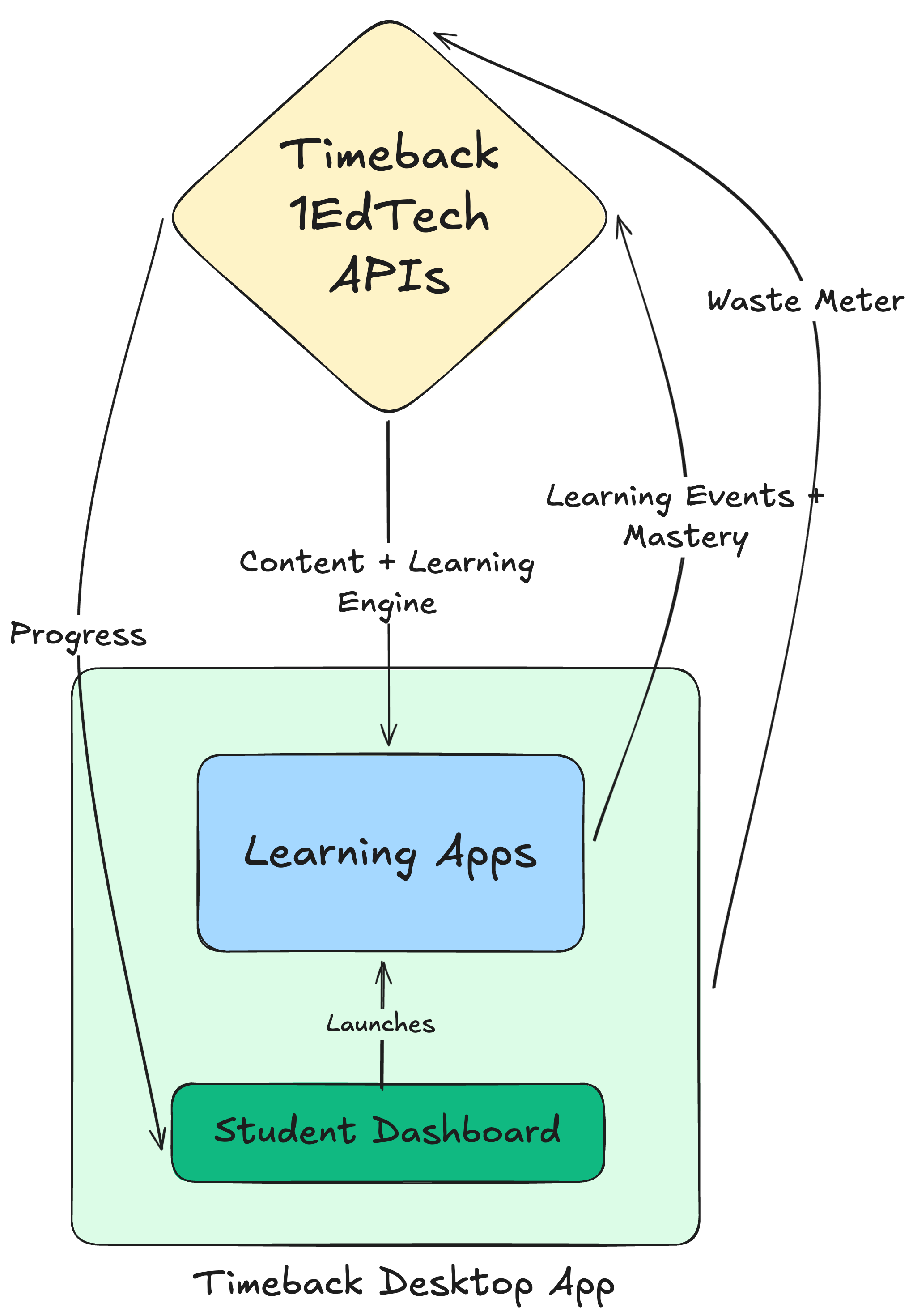
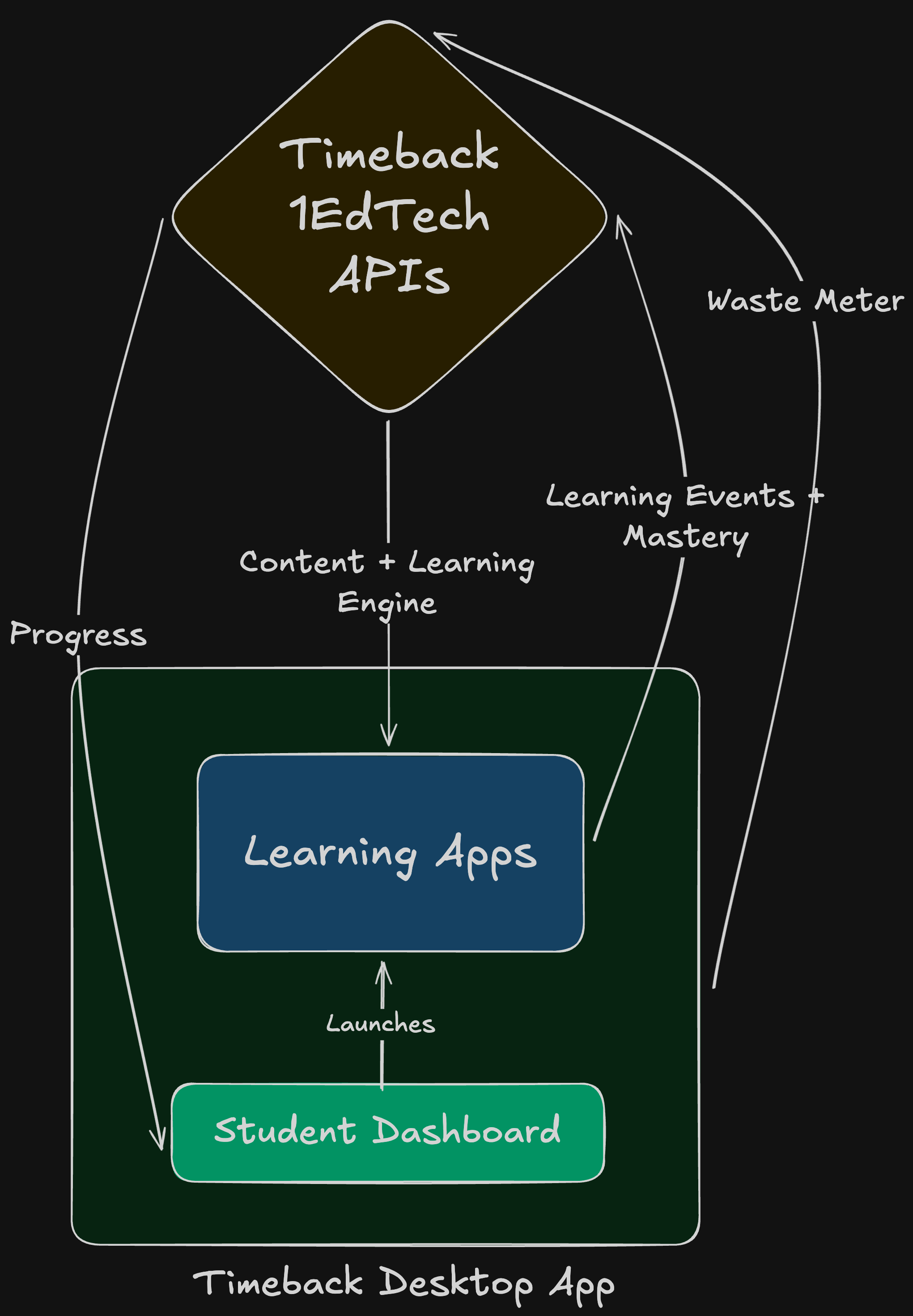
| Desktop App | Student launcher with waste detection and time-on-task |
| Dashboards | Progress for students; analytics for developers |
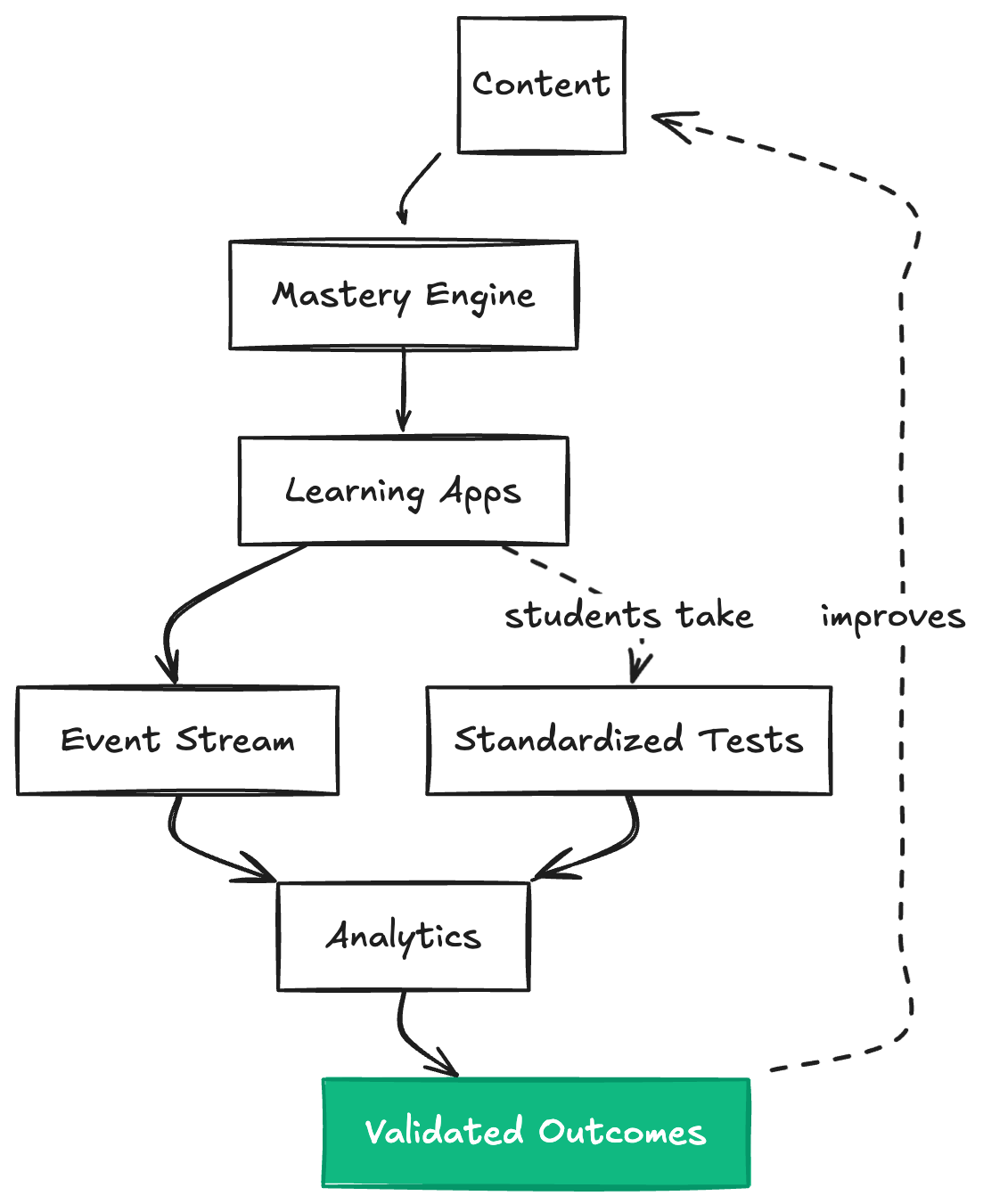
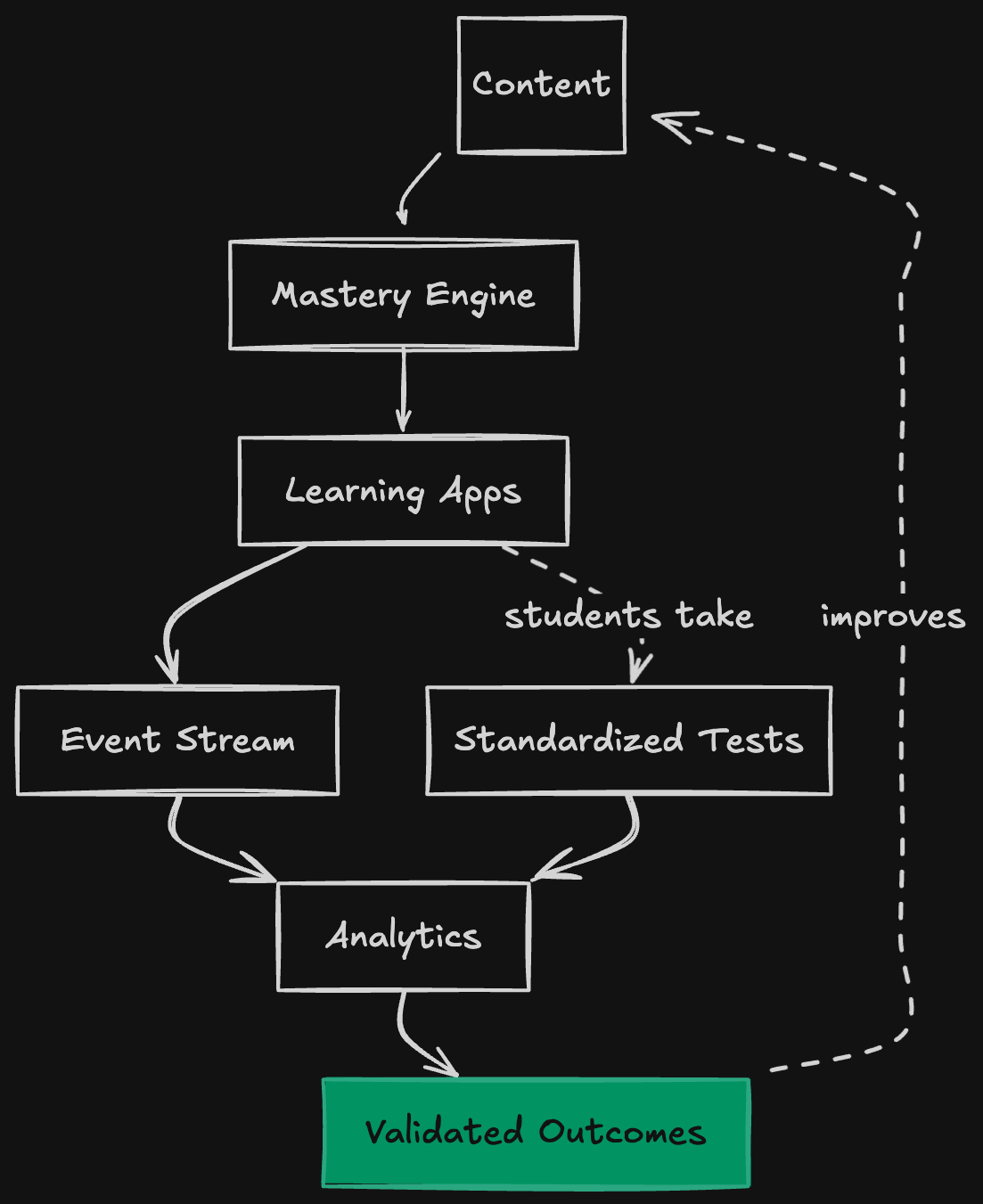
| Closed loop | External tests connect in-app activity to real outcomes |
 ### Layer 1: Standards backbone
The foundation is a set of **1EdTech-compliant APIs** that implement industry-standard data models. Schools already speak these standards for rostering, assessments, and analytics. By building on them, Timeback apps integrate with existing school infrastructure without custom bridges.
This layer handles the data you would otherwise need to define and store yourself: students, classes, enrollments, courses, content, results, and learning events.
### Layer 2: Learning system
The middle layer provides **mastery tracking and the closed-loop feedback system**. It takes raw events from apps and turns them into progress signals that are comparable, analyzable, and tied to outcomes.
As a student engages with an activity, the learning system tracks time spent continuously via periodic heartbeats. When the student completes the activity, the system records the result, updates mastery state, and feeds signals into the analytics pipeline. The SDK supports [two activity models](/beta/about-timeback/concepts/activity-models): single-session activities where the client reports everything, and stateful activities where the client tracks time per session while the server records completion. Apps provide XP based on their own reward logic, and the platform aggregates it across the ecosystem. When standardized test results arrive, the system correlates them with in-app behavior to identify what worked and what needs adjustment.
### Layer 3: Student experience
The top layer is where students and educators interact with the platform. This includes **learning apps** (both first-party and third-party), **dashboards** for progress visibility, and the **Timeback Desktop App** for monitoring and launching content.
Developers build at this layer. The platform handles everything below.
## The Timeback stack
Here is what developers actually interact with when building on the platform:
| Component | What it does |
| ------------------------ | --------------------------------------------------------------------------------- |
| **Timeback APIs** | 1EdTech-compliant endpoints for rosters, launch, content, events, and credentials |
| **Timeback Desktop App** | Student-facing launcher that collects engagement signals (waste, time-on-task) |
| **Student Dashboards** | Progress visibility including XP, mastery state, and time-back tracking |
| **Developer Dashboards** | Analytics and outcome correlation for monitoring app performance |
### Timeback APIs
Rather than inventing proprietary interfaces, the platform implements industry specs directly. For developers, this means:
* **No lock-in.** The APIs you learn here work with other compliant systems. Your skills and code are portable.
* **Schools already trust it.** Procurement conversations are easier when you're implementing specs schools already require.
* **Skip years of infrastructure.** Rostering, identity, event logging, and analytics are solved. Build what differentiates you.
### Layer 1: Standards backbone
The foundation is a set of **1EdTech-compliant APIs** that implement industry-standard data models. Schools already speak these standards for rostering, assessments, and analytics. By building on them, Timeback apps integrate with existing school infrastructure without custom bridges.
This layer handles the data you would otherwise need to define and store yourself: students, classes, enrollments, courses, content, results, and learning events.
### Layer 2: Learning system
The middle layer provides **mastery tracking and the closed-loop feedback system**. It takes raw events from apps and turns them into progress signals that are comparable, analyzable, and tied to outcomes.
As a student engages with an activity, the learning system tracks time spent continuously via periodic heartbeats. When the student completes the activity, the system records the result, updates mastery state, and feeds signals into the analytics pipeline. The SDK supports [two activity models](/beta/about-timeback/concepts/activity-models): single-session activities where the client reports everything, and stateful activities where the client tracks time per session while the server records completion. Apps provide XP based on their own reward logic, and the platform aggregates it across the ecosystem. When standardized test results arrive, the system correlates them with in-app behavior to identify what worked and what needs adjustment.
### Layer 3: Student experience
The top layer is where students and educators interact with the platform. This includes **learning apps** (both first-party and third-party), **dashboards** for progress visibility, and the **Timeback Desktop App** for monitoring and launching content.
Developers build at this layer. The platform handles everything below.
## The Timeback stack
Here is what developers actually interact with when building on the platform:
| Component | What it does |
| ------------------------ | --------------------------------------------------------------------------------- |
| **Timeback APIs** | 1EdTech-compliant endpoints for rosters, launch, content, events, and credentials |
| **Timeback Desktop App** | Student-facing launcher that collects engagement signals (waste, time-on-task) |
| **Student Dashboards** | Progress visibility including XP, mastery state, and time-back tracking |
| **Developer Dashboards** | Analytics and outcome correlation for monitoring app performance |
### Timeback APIs
Rather than inventing proprietary interfaces, the platform implements industry specs directly. For developers, this means:
* **No lock-in.** The APIs you learn here work with other compliant systems. Your skills and code are portable.
* **Schools already trust it.** Procurement conversations are easier when you're implementing specs schools already require.
* **Skip years of infrastructure.** Rostering, identity, event logging, and analytics are solved. Build what differentiates you.

 ### 1EdTech Standards
The Timeback APIs are **1EdTech standards**. 1EdTech (formerly IMS Global) maintains the most comprehensive set of education interoperability standards, and most LMS platforms, SIS systems, and assessment tools already implement some subset of these specs.
| Standard | What it enables | What you skip building |
| ------------- | --------------------------------------------------------------------- | ---------------------------------------------------------- |
| **OneRoster** | Sync students, classes, and enrollments with school SIS systems | Identity management, rostering pipelines, enrollment logic |
| **LTI** | Single sign-on launch from LMS platforms into your app | OAuth flows, session management, user provisioning |
| **QTI** | Interoperable question and assessment formats | Custom question schemas, scoring engines, item banks |
| **Caliper** | Standardized learning event stream for analytics | Event taxonomies, data pipelines, analytics infrastructure |
| **CASE** | Alignment to academic standards (Common Core, NGSS, state frameworks) | Standards databases, crosswalk mappings |
| **CLR** | Portable learner records across platforms | Transcript formats, credential verification |
Timeback extends these standards where necessary to support learning science requirements (mastery thresholds, XP calculations, closed-loop validation) while maintaining compatibility with the base specs.
### 1EdTech Standards
The Timeback APIs are **1EdTech standards**. 1EdTech (formerly IMS Global) maintains the most comprehensive set of education interoperability standards, and most LMS platforms, SIS systems, and assessment tools already implement some subset of these specs.
| Standard | What it enables | What you skip building |
| ------------- | --------------------------------------------------------------------- | ---------------------------------------------------------- |
| **OneRoster** | Sync students, classes, and enrollments with school SIS systems | Identity management, rostering pipelines, enrollment logic |
| **LTI** | Single sign-on launch from LMS platforms into your app | OAuth flows, session management, user provisioning |
| **QTI** | Interoperable question and assessment formats | Custom question schemas, scoring engines, item banks |
| **Caliper** | Standardized learning event stream for analytics | Event taxonomies, data pipelines, analytics infrastructure |
| **CASE** | Alignment to academic standards (Common Core, NGSS, state frameworks) | Standards databases, crosswalk mappings |
| **CLR** | Portable learner records across platforms | Transcript formats, credential verification |
Timeback extends these standards where necessary to support learning science requirements (mastery thresholds, XP calculations, closed-loop validation) while maintaining compatibility with the base specs.
 ### What the loop measures
The platform captures signals at multiple levels:
| Signal | What it indicates |
| ---------------------------- | ---------------------------------- |
| **XP earned** | Volume of productive learning time |
| **Accuracy** | Quality of understanding |
| **Time-to-mastery** | Efficiency of instruction |
| **Waste percentage** | Behavior and motivation issues |
| **Standardized test scores** | Transfer to external assessments |
### Why the loop matters for developers
Most edtech companies can't prove their product works. They show engagement metrics, completion rates, and testimonials. But when a school asks "did students learn more?", the honest answer is usually "we don't know."
The closed loop changes this. For developers, it provides:
**Proof that works in sales.** If students using your content show better standardized test outcomes, the data demonstrates it. You can walk into a procurement meeting with evidence, not promises.
**Diagnosis when things break.** If outcomes aren't improving, you see exactly where the breakdown happens:
* **Motivation issues** (low minutes, high waste, inconsistent effort): the problem is upstream of your content
* **Placement issues** (accuracy too high or too low): students are in the wrong place in the curriculum
* **Curriculum issues** (students complete content but scores don't improve): your instruction needs work
**Faster iteration.** Instead of waiting months for anecdotal feedback, you see the impact of changes in the data. Did the new lesson sequence improve time-to-mastery? Did the redesigned practice set increase transfer to assessments? The loop tells you.
### External validation
Timeback ties in-app progress to rigorous external assessments:
* **MAP Growth**: Norm-referenced achievement and growth measurement
* **State assessments**: Criterion-referenced mastery verification
* **SAT/AP**: College readiness and advanced placement
When test results arrive, the analytics pipeline correlates them with in-app behavior. This enables comparisons: Did 30 minutes in App A produce more measurable learning than 30 minutes in App B?
### Hole filling
External validation reveals gaps. Hole filling addresses them.
When a student scores below mastery on a standardized test (less than 90%), the platform analyzes which standards were missed and generates a **targeted remediation course** containing just the lessons needed to fill the specific gaps. The student completes the hole-filling content, retests, and only advances once mastery is demonstrated.
This is the second half of the closed loop. Validation tells you *what's wrong*. Hole filling *fixes it*.
For developers, hole filling means your content participates in a system that actually responds to failure. If students struggle with specific lessons, the platform can route them to remediation (from your app or another) and bring them back to retry. You don't have to build the diagnostic or routing logic yourself.
## Where your app fits
Apps integrate with Timeback at different depths depending on what they need:
| Integration level | What you use | What you get |
| ----------------- | -------------------------------------------------------- | --------------------------------------------------- |
| **Basic** | LTI launch, OneRoster enrollments | Single sign-on, roster sync |
| **Events** | Caliper events (heartbeats + completions), progress APIs | Analytics, XP tracking, dashboards |
| **Assessments** | QTI content, adaptive delivery APIs | Adaptive quizzes, mastery gating |
| **Full** | All APIs, standards alignment | Complete curriculum integration, outcome validation |
### What you build versus what the platform provides
| You build | Platform provides |
| -------------------------------- | -------------------------------------------- |
| Learning experiences and content | Rostering and identity management |
| Question items and lesson flows | Authentication and permissions |
| UI and interaction design | Progress tracking and mastery state |
| Game mechanics and motivation | XP tracking, aggregation, and reward systems |
| Subject-specific pedagogy | Analytics and outcome measurement |
| Your unique value proposition | Standards compliance and school integrations |
### Integration paths
**Launch via LTI**: Students start in the Timeback Desktop App or an LMS. When they select your app, they are launched with identity and context already provided. You do not need to build login flows or user management.
**Emit events via Caliper**: Activity telemetry is split into continuous time-spent heartbeats and completion submissions. The SDK correlates these events per run, and stateful apps can record completion from the backend while still reporting time from the frontend. The platform captures the stream, updates progress, and feeds analytics.
**Read and write via OneRoster**: Query enrollments to know what content a student should see. Write results to the gradebook so scores appear in dashboards and reports. You do not need to define your own data models for courses and progress.
**Deliver assessments via QTI**: Store questions in QTI format. Use the platform's adaptive delivery APIs for placement tests and mastery-based progression. You do not need to build quiz engines or adaptive algorithms from scratch.
### What the loop measures
The platform captures signals at multiple levels:
| Signal | What it indicates |
| ---------------------------- | ---------------------------------- |
| **XP earned** | Volume of productive learning time |
| **Accuracy** | Quality of understanding |
| **Time-to-mastery** | Efficiency of instruction |
| **Waste percentage** | Behavior and motivation issues |
| **Standardized test scores** | Transfer to external assessments |
### Why the loop matters for developers
Most edtech companies can't prove their product works. They show engagement metrics, completion rates, and testimonials. But when a school asks "did students learn more?", the honest answer is usually "we don't know."
The closed loop changes this. For developers, it provides:
**Proof that works in sales.** If students using your content show better standardized test outcomes, the data demonstrates it. You can walk into a procurement meeting with evidence, not promises.
**Diagnosis when things break.** If outcomes aren't improving, you see exactly where the breakdown happens:
* **Motivation issues** (low minutes, high waste, inconsistent effort): the problem is upstream of your content
* **Placement issues** (accuracy too high or too low): students are in the wrong place in the curriculum
* **Curriculum issues** (students complete content but scores don't improve): your instruction needs work
**Faster iteration.** Instead of waiting months for anecdotal feedback, you see the impact of changes in the data. Did the new lesson sequence improve time-to-mastery? Did the redesigned practice set increase transfer to assessments? The loop tells you.
### External validation
Timeback ties in-app progress to rigorous external assessments:
* **MAP Growth**: Norm-referenced achievement and growth measurement
* **State assessments**: Criterion-referenced mastery verification
* **SAT/AP**: College readiness and advanced placement
When test results arrive, the analytics pipeline correlates them with in-app behavior. This enables comparisons: Did 30 minutes in App A produce more measurable learning than 30 minutes in App B?
### Hole filling
External validation reveals gaps. Hole filling addresses them.
When a student scores below mastery on a standardized test (less than 90%), the platform analyzes which standards were missed and generates a **targeted remediation course** containing just the lessons needed to fill the specific gaps. The student completes the hole-filling content, retests, and only advances once mastery is demonstrated.
This is the second half of the closed loop. Validation tells you *what's wrong*. Hole filling *fixes it*.
For developers, hole filling means your content participates in a system that actually responds to failure. If students struggle with specific lessons, the platform can route them to remediation (from your app or another) and bring them back to retry. You don't have to build the diagnostic or routing logic yourself.
## Where your app fits
Apps integrate with Timeback at different depths depending on what they need:
| Integration level | What you use | What you get |
| ----------------- | -------------------------------------------------------- | --------------------------------------------------- |
| **Basic** | LTI launch, OneRoster enrollments | Single sign-on, roster sync |
| **Events** | Caliper events (heartbeats + completions), progress APIs | Analytics, XP tracking, dashboards |
| **Assessments** | QTI content, adaptive delivery APIs | Adaptive quizzes, mastery gating |
| **Full** | All APIs, standards alignment | Complete curriculum integration, outcome validation |
### What you build versus what the platform provides
| You build | Platform provides |
| -------------------------------- | -------------------------------------------- |
| Learning experiences and content | Rostering and identity management |
| Question items and lesson flows | Authentication and permissions |
| UI and interaction design | Progress tracking and mastery state |
| Game mechanics and motivation | XP tracking, aggregation, and reward systems |
| Subject-specific pedagogy | Analytics and outcome measurement |
| Your unique value proposition | Standards compliance and school integrations |
### Integration paths
**Launch via LTI**: Students start in the Timeback Desktop App or an LMS. When they select your app, they are launched with identity and context already provided. You do not need to build login flows or user management.
**Emit events via Caliper**: Activity telemetry is split into continuous time-spent heartbeats and completion submissions. The SDK correlates these events per run, and stateful apps can record completion from the backend while still reporting time from the frontend. The platform captures the stream, updates progress, and feeds analytics.
**Read and write via OneRoster**: Query enrollments to know what content a student should see. Write results to the gradebook so scores appear in dashboards and reports. You do not need to define your own data models for courses and progress.
**Deliver assessments via QTI**: Store questions in QTI format. Use the platform's adaptive delivery APIs for placement tests and mastery-based progression. You do not need to build quiz engines or adaptive algorithms from scratch.