

This is a conceptual map. Available launchers, dashboards, analytics, and remediation flows depend on the deployed product and configuration. The SDK and API guides describe the verified integration contracts; the diagrams do not establish a live deployment or universal automation.
TL;DR: The Timeback platform stack
TL;DR: The Timeback platform stack
| Component | What it provides |
|---|---|
| Timeback APIs | 1EdTech standards for rosters, content, events, and more |
| Desktop App | Student launcher with waste detection and time-on-task |
| Dashboards | Progress for students; analytics for developers |
| Closed loop | External tests connect in-app activity to real outcomes |
Platform architecture
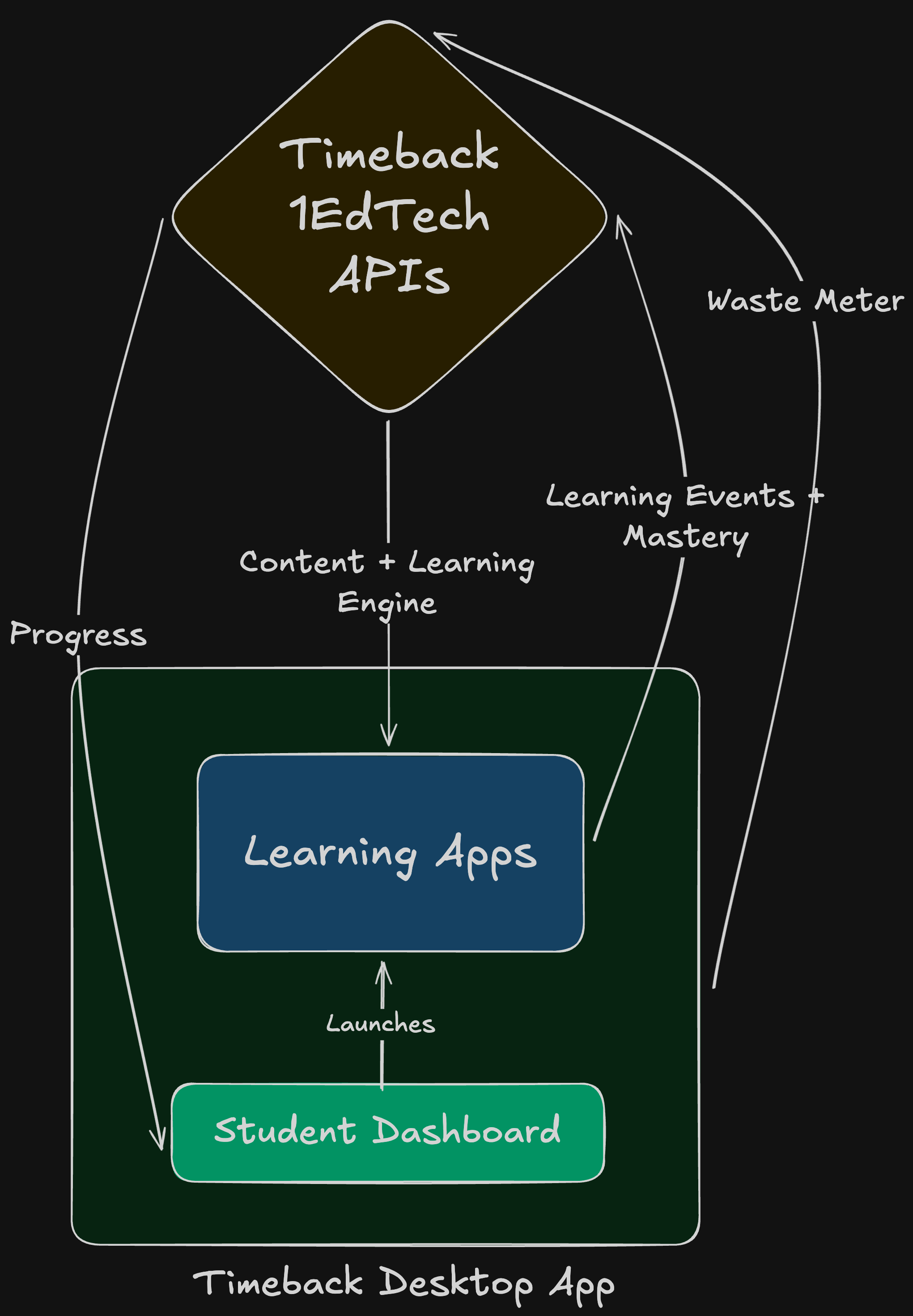
Timeback is built as a three-layer system. Each layer builds on the one below it, and the entire stack is designed around a single goal: connecting what happens in apps to what students can demonstrate on credible assessments.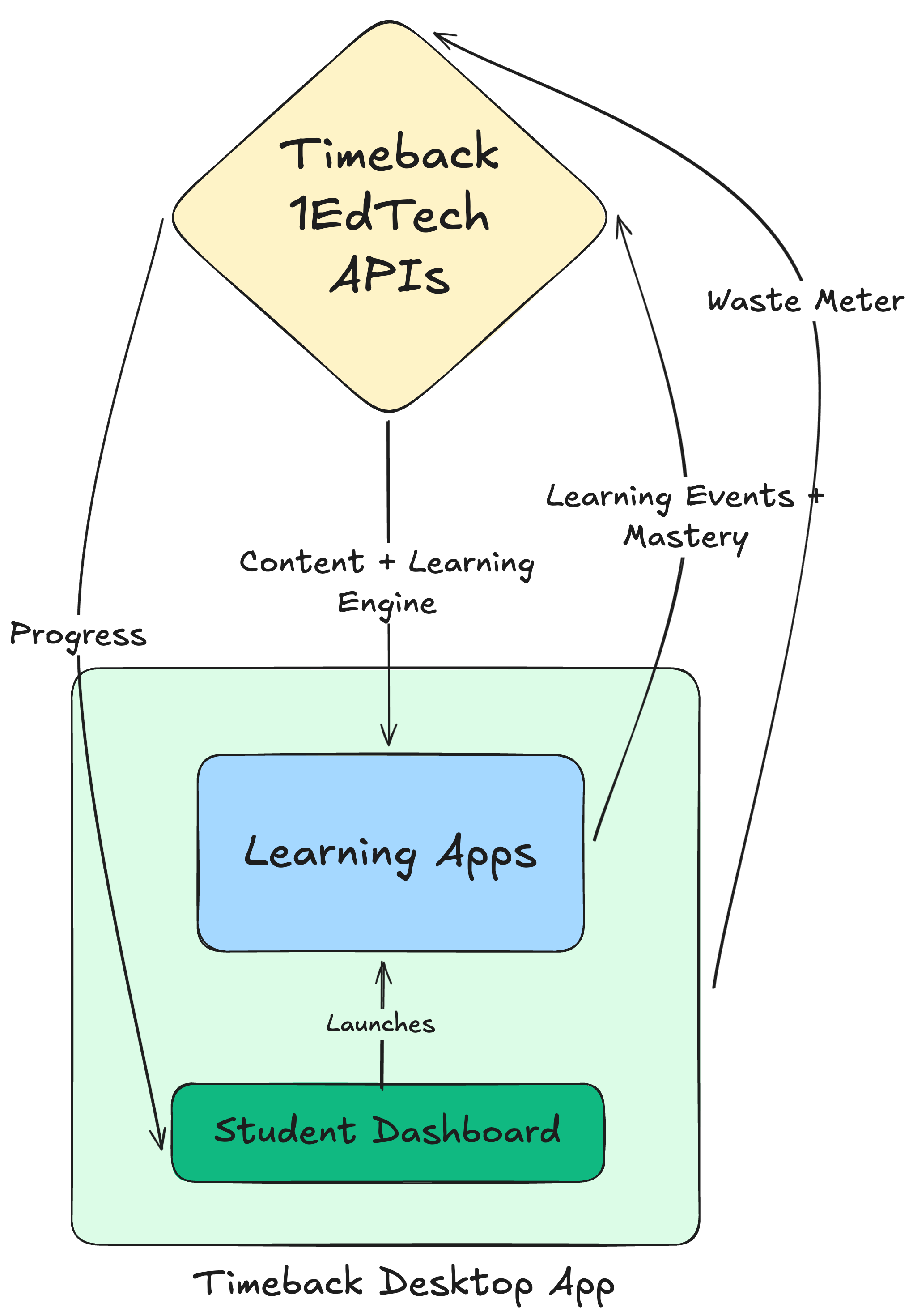
Layer 1: Standards backbone
The foundation is a set of APIs based on 1EdTech data models that implement industry-standard data models. Schools already speak these standards for rostering, assessments, and analytics. Interoperability still requires supported operations, identity mapping, authorization, and app-specific integration. This layer handles the data you would otherwise need to define and store yourself: students, classes, enrollments, courses, content, results, and learning events.Layer 2: Learning system
The middle layer provides mastery tracking and the closed-loop feedback system. It takes raw events from apps and turns them into progress signals that are comparable, analyzable, and tied to outcomes. As a student engages with an activity, the learning system tracks time spent continuously via periodic heartbeats. When the student completes the activity, the system records the result, updates mastery state, and feeds signals into the analytics pipeline. The SDK supports two activity models: single-session activities where the client reports everything, and stateful activities where the client tracks time per session while the server records completion. Apps provide XP based on their own reward logic, and the platform aggregates it across the ecosystem. When standardized test results arrive, the system correlates them with in-app behavior to identify what worked and what needs adjustment.Layer 3: Student experience
The top layer is where students and educators interact with the platform. This includes learning apps (both first-party and third-party), dashboards for progress visibility, and the Timeback Desktop App for monitoring and launching content. Developers build at this layer. Your app must still configure identity, validate outcomes, handle failures, and render its learning experience.The Timeback stack
Here is what developers actually interact with when building on the platform:Timeback APIs
Rather than inventing proprietary interfaces, the platform implements industry specs directly. For developers, this means:- Shared models. Standard concepts reduce translation work; extensions and service-specific behavior still need explicit mapping.
- Integration requirements. Confirm the exact standards, versions, and compliance evidence required by each school.
- Reusable services. Use the supported APIs for rostering, events, and analytics while handling your integration’s identity and failure modes.


1EdTech standards
Timeback services use 1EdTech data models and service-specific extensions. Consult each API’s current paths, schemas, and authorization requirements; the existence of an implementation is not a certification claim or a guarantee that every operation in the standard is supported.
A shared data model helps interoperability. It does not automatically make two apps’ identifiers, progress scales, or mastery policies interchangeable. See API reference and SDK identity.
Timeback Desktop App
Students launch learning apps through the Timeback Desktop App. Beyond serving as a launcher, it collects engagement signals that feed into the analytics pipeline:- Waste detection: Identifies when students are idle, distracted, or multitasking
- Time-on-task measurement: Distinguishes active learning from passive screen time
- Session context: Captures which apps are in use and for how long
Student and developer dashboards
Student dashboards expose progress in a way that reinforces motivation: XP earned, mastery achieved, time reclaimed. Students see exactly where they stand and what is left to complete. Developer dashboards show how your app performs across the student population: completion rates, accuracy distributions, time-to-mastery, and correlation with standardized test outcomes. When something is not working, you see it in the data.The closed loop
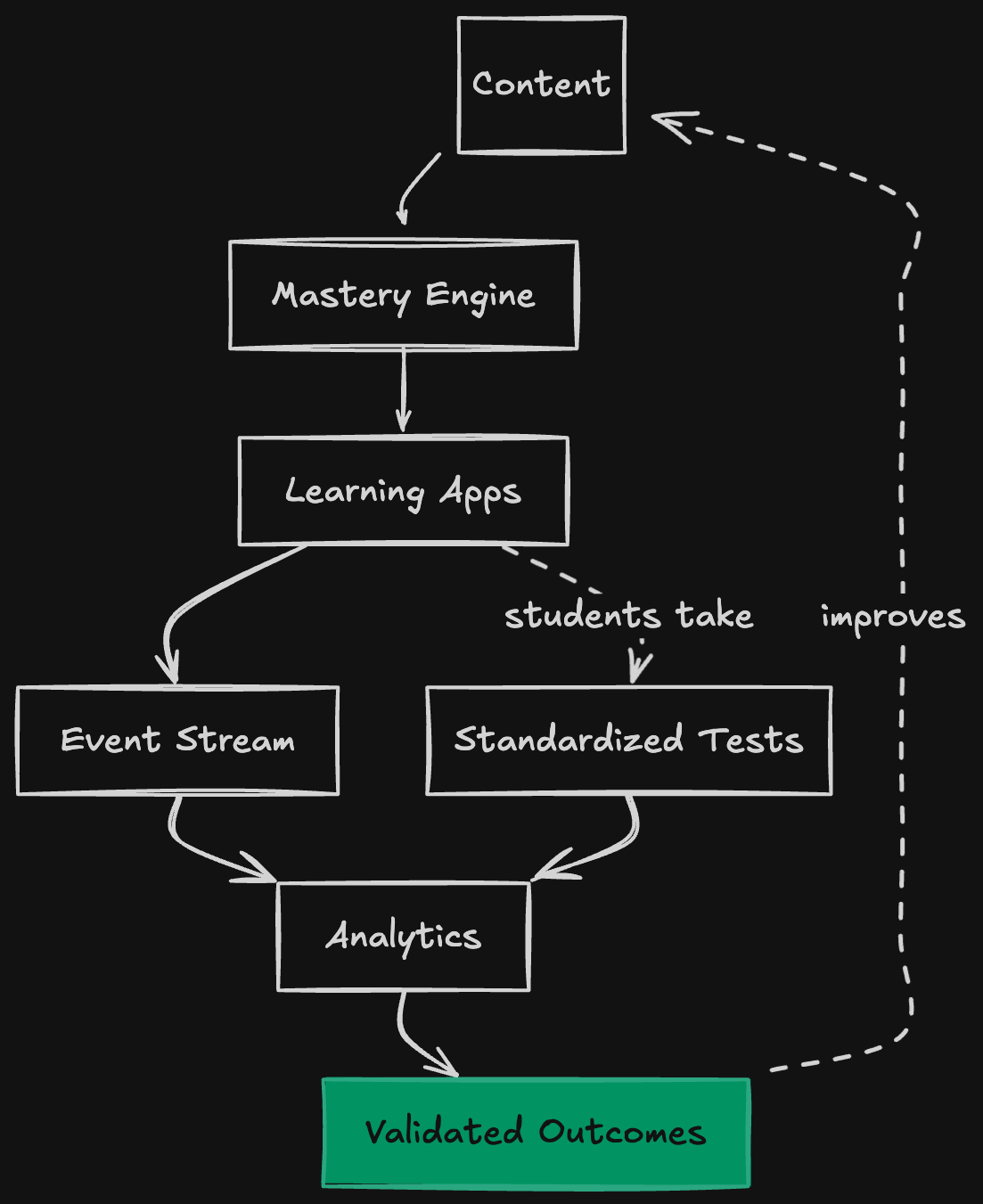
Most edtech products operate in an open loop: students use the app, some metrics are collected, but nobody knows if learning actually happened. Engagement is tracked because it can be measured. Outcomes are not tracked because they require external validation. Timeback operates in a closed loop: in-app activity is tied to standardized test performance, and the correlation is used to improve instruction.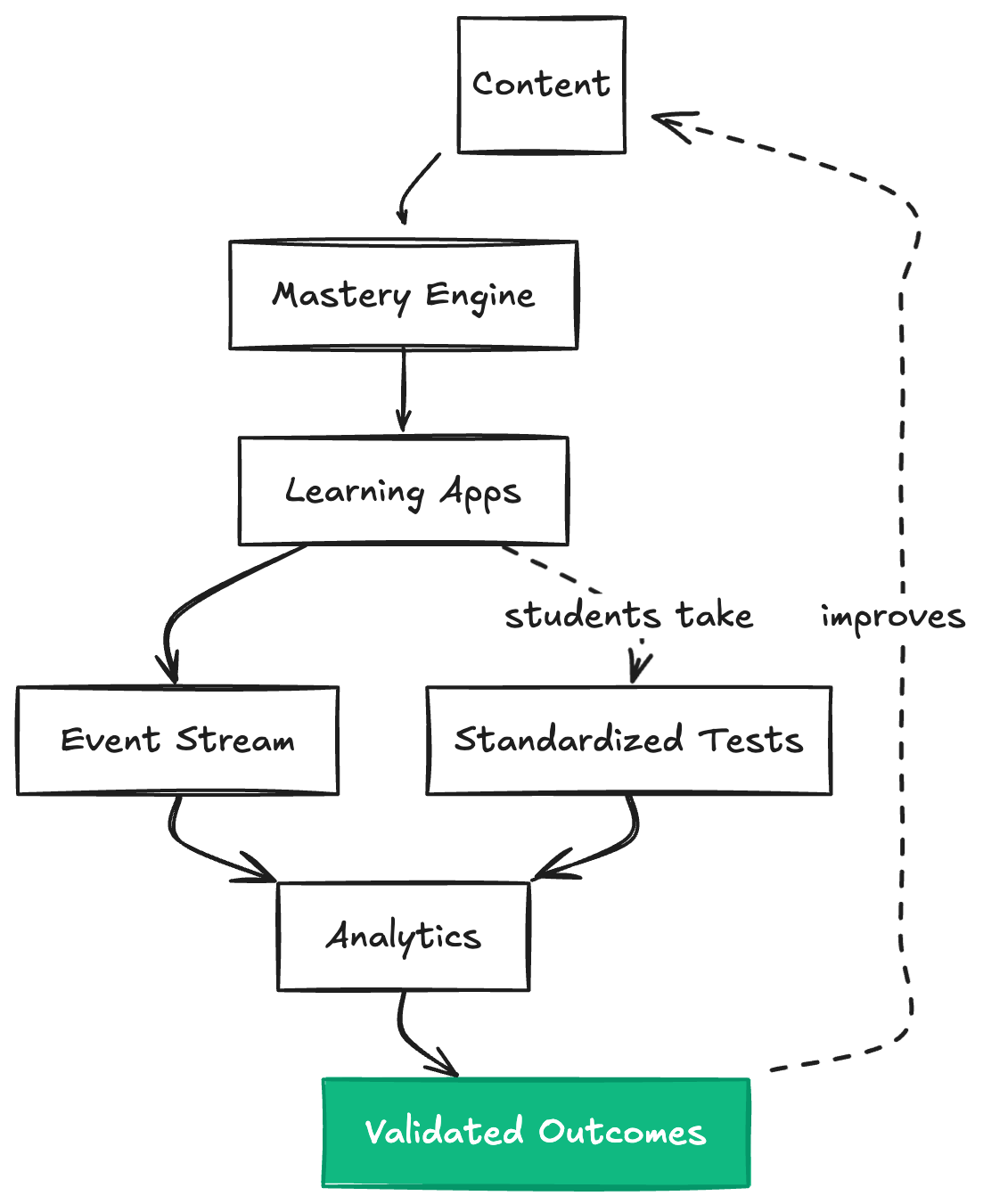
What the loop measures
The platform captures signals at multiple levels:Why the loop matters for developers
Most edtech companies can’t prove their product works. They show engagement metrics, completion rates, and testimonials. But when a school asks “did students learn more?”, the honest answer is usually “we don’t know.” The closed loop changes this. For developers, it provides: Evidence for evaluation. Linked activity and assessment data can support analysis. Correlation alone does not establish that an app caused improved learning. Diagnosis when things break. If outcomes aren’t improving, you see exactly where the breakdown happens:- Motivation issues (low minutes, high waste, inconsistent effort): the problem is upstream of your content
- Placement issues (accuracy too high or too low): students are in the wrong place in the curriculum
- Curriculum issues (students complete content but scores don’t improve): your instruction needs work
External validation
Timeback ties in-app progress to rigorous external assessments:- MAP Growth: Norm-referenced achievement and growth measurement
- State assessments: Criterion-referenced mastery verification
- SAT/AP: College readiness and advanced placement
Hole filling
External validation reveals gaps. Hole filling addresses them. Supported remediation workflows can use assessment results and missed standards to select targeted content and schedule a retest. Eligibility, score thresholds, grade bands, available content, and progression steps vary by subject, app, and workflow. A score below 90% does not universally or immediately create a hole-filling course. This is the second half of the closed loop. Validation tells you what’s wrong. Hole filling fixes it. For developers, hole filling means your content participates in a system that actually responds to failure. If students struggle with specific lessons, the platform can route them to remediation (from your app or another) and bring them back to retry. An adapter or configured workflow must support the required content and routing.Where your app fits
Apps integrate with Timeback at different depths depending on what they need:What you build versus what the platform provides
Integration paths
Launch and identity: LTI launch and SDK OIDC SSO are separate integration contracts. For the SDK, configure SSO or custom identity and own a secure application session. Do not assume every launcher uses LTI or that a launch URL alone authenticates the user. Emit events via Caliper: Activity telemetry is split into continuous time-spent heartbeats and completion submissions. The SDK correlates these events per run, and stateful apps can record completion from the backend while still reporting time from the frontend. The platform captures the stream, updates progress, and feeds analytics. Read and write via OneRoster: Query enrollments to know what content a student should see. Write results to the gradebook so scores appear in dashboards and reports. You do not need to define your own data models for courses and progress. Deliver assessments via QTI: Store questions in QTI format. Use the platform’s adaptive delivery APIs for placement tests and mastery-based progression. You do not need to build quiz engines or adaptive algorithms from scratch.The depth of integration is your choice. Some apps only need launch and events. Others use the
full stack. Start with what you need and add more as your product matures.
What this enables for developers
Building on Timeback means inheriting infrastructure that would otherwise take years to build: Skip the commodity work. Rostering, identity, progress tracking, analytics, and school integrations are solved. Focus on the learning experience that differentiates your app. Know if your app works. The closed loop validates whether your content produces measurable learning gains. Iterate based on outcomes, not just engagement. Reach students through existing channels. Apps on Timeback reach students through Alpha School, partner schools, and direct-to-consumer channels subject to onboarding, curriculum fit, approval, and deployment availability. Compound with the ecosystem. Apps that follow Timeback’s learning science principles work together. A tutoring app can pick up where a lesson app left off because both share the same progress model.This page covers how the platform works. For the learning science principles that guide what
apps should do, see The Principles. For integration guides
and API reference, see Build on Timeback.
The Problem
Why current edtech cannot prove outcomes.
The Vision
What Timeback is building toward.
The Principles
Learning science constraints that protect outcomes.
Why Build Here
What developers get from the platform.